commitlint でコミットコメントをルール化する
- #github
- #commitlint
commitlint というOSSでコミットコメントのルール化ができます。
commitlint の導入方針
以下の方針で commitlint を導入していきます。
- 基本的なルールはConventional Commitsに従う
- type は共通リポジトリで管理し、scope は個別リポジトリで管理する
共通リポジトリの作成
リポジトリの参照方法
GitHub でソースコードを管理する場合、共通リポジトリの npm パッケージを個別リポジトリから参照する方法がいくつかあります。
- GitHub Packages に publish し、参照元リポジトリ側で regisry を追加して参照する
- GitHub リポジトリを SSH/HTTP で直接参照する
- その他 (npm に publish する等)
1の場合はPersonal access token (classic)を、2の場合は SSHキー等を認証に使用します。
1の方が SemVer を使用した細やかなバージョン管理や、PAT による権限管理ができるメリットがある為、今回は1の方法で、privateリポジトリを使用します。
※ private リポジトリの場合は利用制限があるので注意が必要です。
共通ルールの作成
mise を使用して環境構築していきます。
mise use node@24 pnpm preknpm パッケージを追加します。
pnpm init
pnpm add -D @commitlint/cli @commitlint/config-conventional @commitlint/lint vitest
commitlint の設定を行います。 日本語の subject, body に対応する為、caseのチェックを外しておきます。
commitlint.config.js
export default {
  extends: ['@commitlint/config-conventional'],
  rules: {
    'type-enum': [2, 'always', [
      'build',
      'ci',
      'docs',
      'feat',
      'fix',
      'perf',
      'refactor',
      'style',
      'test',
      'chore',
    ]],
    'subject-case': [0],
    'subject-full-stop': [0],
    'body-case': [0],
    'subject-max-length': [2, 'always', 72],
  }
};
テストも書いておきます。
commitlint.config.test.js
import { describe, it, expect } from 'vitest';
import lint from '@commitlint/lint';
import config from './commitlint.config.js';

const lintMessage = (message) => lint(message, config.rules);

describe('commitlint.config', () => {
  describe('type-enum', () => {
    const validTypes = [
      'build',
      'ci',
      'docs',
      'feat',
      'fix',
      'perf',
      'refactor',
      'style',
      'test',
      'chore',
    ];

    it.each(validTypes)('should pass for valid type: %s', async (type) => {
      const result = await lintMessage(`${type}: add new feature`);
      expect(result.valid).toBe(true);
    });

    it('should fail for invalid type', async () => {
      const result = await lintMessage('invalid: some message');
      expect(result.valid).toBe(false);
      expect(result.errors.some((e) => e.name === 'type-enum')).toBe(true);
    });
  });

  describe('subject-full-stop', () => {
    it('should pass for subject ending with a period', async () => {
      const result = await lintMessage('feat: 句読点を含む日本語を許可する。');
      expect(result.valid).toBe(true);
    });
  });

  describe('body-case', () => {
    it('should pass for body with uppercase text', async () => {
      const result = await lintMessage('feat: add new feature\n\nBODYに日本語を使用可能。');
      expect(result.valid).toBe(true);
    });
  });

  describe('subject-max-length', () => {
    it('should pass for subject within 72 characters', async () => {
      const subject = 'a'.repeat(72);
      const result = await lintMessage(`feat: ${subject}`);
      expect(result.valid).toBe(true);
    });

    it('should pass for subject with Japanese characters', async () => {
      const result = await lintMessage('feat: 日本語で説明を記載可能');
      expect(result.valid).toBe(true);
    });

    it('should fail for subject exceeding 72 characters', async () => {
      const subject = 'a'.repeat(73);
      const result = await lintMessage(`feat: ${subject}`);
      expect(result.valid).toBe(false);
      expect(result.errors.some((e) => e.name === 'subject-max-length')).toBe(true);
    });
  });
});
package.json の main, files, scripts, type, repository, publishConfig を追加・修正し、テストを流しておきます。
package.json
{
  "name": "@user_name/commitlint-config",
  "version": "1.0.0",
  "description": "",
  "main": "commitlint.config.js",
  "files": [
    "commitlint.config.js"
  ],
  "scripts": {
    "test": "vitest run"
  },
  "type": "module",
  "keywords": [],
  "author": "",
  "license": "ISC",
  "packageManager": "pnpm@10.29.1",
  "repository": {
    "type": "git",
    "url": "https://github.com/<user_name>/<repository_name>.git"
  },
  "publishConfig": {
    "registry": "https://npm.pkg.github.com"
  },
  "devDependencies": {
    "@commitlint/cli": "^20.4.1",
    "@commitlint/config-conventional": "^20.4.1",
    "@commitlint/lint": "^20.4.1",
    "vitest": "^4.0.18"
  }
}
pnpm test
結果
 ✓ commitlint.config.test.js (16 tests) 18ms
   ✓ commitlint.config (16)
     ✓ type-enum (11)
       ✓ should pass for valid type: build 5ms
       ✓ should pass for valid type: ci 1ms
       ✓ should pass for valid type: docs 1ms
       ✓ should pass for valid type: feat 0ms
       ✓ should pass for valid type: fix 1ms
       ✓ should pass for valid type: perf 0ms
       ✓ should pass for valid type: refactor 1ms
       ✓ should pass for valid type: style 0ms
       ✓ should pass for valid type: test 1ms
       ✓ should pass for valid type: chore 1ms
       ✓ should fail for invalid type 1ms
     ✓ subject-full-stop (1)
       ✓ should pass for subject ending with a period 1ms
     ✓ body-case (1)
       ✓ should pass for body with uppercase text 2ms
     ✓ subject-max-length (3)
       ✓ should pass for subject within 72 characters 1ms
       ✓ should pass for subject with Japanese characters 1ms
       ✓ should fail for subject exceeding 72 characters 1ms

 Test Files  1 passed (1)
      Tests  16 passed (16)
   Start at  16:06:31
   Duration  281ms (transform 36ms, setup 0ms, import 141ms, tests 18ms, environment 0ms)
コミット前テストの追加
GitのHooksを使用して、コミット前のテストを追加します。
.pre-commit-config.yaml
repos:
  - repo: local
    hooks:
      - id: commitlint
        name: commitlint
        entry: pnpm exec commitlint --edit
        language: system
        stages: [commit-msg]
設定後、Gitにフックをインストールします。
prek install --hook-type commit-msgコミット前のテストが動いていることを確認しておきます。
git add .
git commit -m "invalid: test"
結果
commitlint...............................................................Failed
- hook id: commitlint
- exit code: 1

  ⧗   input: invalid: test
  ✖   type must be one of [build, ci, docs, feat, fix, perf, refactor, style, test, chore] [type-enum]

  ✖   found 1 problems, 0 warnings
  ⓘ   Get help: https://github.com/conventional-changelog/commitlint/#what-is-commitlint
GitHub Actions の設定 (commitlint)
main へのPRについて、test と commitlint を実行するように設定を行います。
.github/workflows/commitlint.yaml
name: Commitlint

on:
  pull_request:
    branches: [main]

jobs:
  commitlint:
    runs-on: ubuntu-latest

    steps:
      - uses: actions/checkout@v4
        with:
          fetch-depth: 0

      - uses: pnpm/action-setup@v4

      - uses: actions/setup-node@v4
        with:
          node-version: 24
          cache: 'pnpm'

      - name: Install dependencies
        run: pnpm install --frozen-lockfile

      - run: pnpm test

      - name: Validate commits
        env:
          BASE_SHA: ${{ github.event.pull_request.base.sha }}
          HEAD_SHA: ${{ github.event.pull_request.head.sha }}
        run: pnpm exec commitlint --from "$BASE_SHA" --to "$HEAD_SHA" --verbose
GitHub Actions の設定 (publish)
Release を発行した際に GitHub Packages に publish するように GitHub Actions の設定を行います。
.github/workflows/publish.yaml
name: Publish to GitHub Packages

on:
  release:
    types: [published]

jobs:
  publish:
    runs-on: ubuntu-latest
    permissions:
      contents: read
      packages: write
    steps:
      - uses: actions/checkout@v4
        with:
          fetch-depth: 0

      - uses: pnpm/action-setup@v4

      - uses: actions/setup-node@v4
        with:
          node-version: 24
          cache: 'pnpm'
          registry-url: 'https://npm.pkg.github.com'

      - name: Install dependencies
        run: pnpm install --frozen-lockfile

      - run: pnpm test

      - run: pnpm publish --no-git-checks
        env:
          NODE_AUTH_TOKEN: ${{ secrets.GITHUB_TOKEN }}
dependabot の設定
dependabot を設定しておきます。
サプライチェーン攻撃を緩和する為、cooldown を設定します。
また、dependabot が 適当なコミットメッセージを書いてチェックに引っ掛からないように commit-message を設定します。参考
.github/dependabot.yaml
version: 2
updates:
  - package-ecosystem: "npm"
    directory: "/"
    schedule:
      interval: "daily"
    cooldown:
      default-days: 2
    commit-message:
      prefix: "build"
同様に pnpm の minimumReleaseAge も設定しておきます。
pnpm-workspace.yaml
packages: []
pnpm:
  updateConfig:
    minimumReleaseAge: 2880
GitHub に push し、PRを作成する
push して、PRを作成してみます。
git switch -c add-config
git add .
git commit -m 'feat: add commitlint config'
git push

gh pr new -f
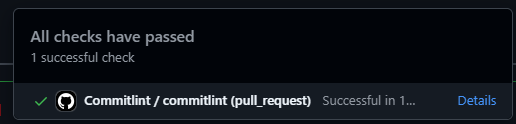
チェックが動いていることを確認し、マージしておきます。
GitHub Packages の発行
Release を作成すると、自動的に GitHub Actions が起動し、GitHub Packages が発行されます。
tag と Release 名はv1.0.0にしておきます。
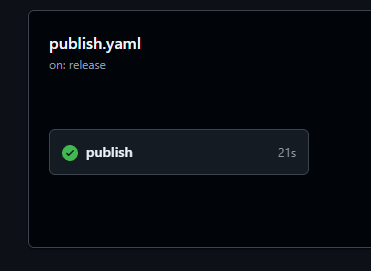
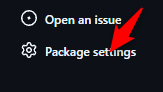
発行が完了したら、GitHubのリポジトリトップページの右下にある Packages のリンクからパッケージを開き、右下の[Packages settings]からパッケージの設定を開きます。
Manage Actions access の [Add Repository] から参照したいリポジトリを追加します。
参照元リポジトリの設定
Personal Access Token (classic) を作成する
read:packages権限を持ったPATを作成し、ghp_から始まるトークン文字列をNPM_TOKEN等の環境変数に設定しておきます。
※ 必要に応じて、.bashrc等にも設定しておきます。
npmパッケージを設定する
GitHub Packages のパッケージを追加する為にリポジトリの設定等を入れていきます。
共通リポジトリは minimumReleaseAge の対象外としておきます。
.npmrc
@<user_name>:registry=https://npm.pkg.github.com
//npm.pkg.github.com/:_authToken=${NPM_TOKEN}
minimum-release-age=2880
minimum-release-age-exclude=@<user_name>/<repository_name>
pnpm-workspace.yaml
packages: []
pnpm:
  updateConfig:
    minimumReleaseAge: 2880
    minimumReleaseAgeExclude:
- "@<user_name>/<repository_name>"設定後、pnpm addを実行します。
pnpm add -D @commitlint/cli @commitlint/config-conventional @<user_name>/<repository_name>個別リポジトリのルールを設定します。
extends に共通リポジトリのパッケージを指定し、rulesに追加のルールを入れていきます。
追加ルールはマージではなく、上書きになるので注意が必要です。
commitlint.config.js
export default {
  extends: ['@<user_name>/<repository_name>'],
  rules: {
    'scope-enum': [2, 'always', ['controller', 'repository', 'service']],
  }
};
設定が想定通りになっているかを確認しておきます。
echo 'feat(invalid): add xxx' | pnpm exec commitlint結果
⧗   input: feat(invalid): add xxx
✖   scope must be one of [controller, repository, service] [scope-enum]

✖   found 1 problems, 0 warnings
ⓘ   Get help: https://github.com/conventional-changelog/commitlint/#what-is-commitlint
GitHub Actions の設定 (commitlint)
共通リポジトリの設定とほぼ同じですが、envを設定する必要があります。
.github/workflows/commitlint.yaml
name: Commitlint

on:
  pull_request:
    types: [opened, synchronize, reopened]

permissions:
  contents: read
  packages: read

jobs:
  commitlint:
    runs-on: ubuntu-latest

    env:
      NPM_TOKEN: ${{ secrets.GITHUB_TOKEN }}

    steps:
      - name: Checkout code
        uses: actions/checkout@v4
        with:
          fetch-depth: 0

      - uses: pnpm/action-setup@v4

      - uses: actions/setup-node@v4
        with:
          node-version: 24

      - name: Install dependencies
        run: pnpm install --frozen-lockfile

      - name: Lint commit messages
        run: pnpm exec commitlint --from "${{ github.event.pull_request.base.sha }}" --to "${{ github.event.pull_request.head.sha }}"
ここまでできたらPRを作成し、動作を確認します。
git switch -c add-commitlint
git add .
git commit -m "ci: add commitlint"
git push

gh pr new -f
同様に失敗するパターンも確認しておきます。
git switch -c invalid-msg
touch README.md
git add .
git commit --no-verify -m 'invalid: invalid commit msg'
git push

gh pr new -f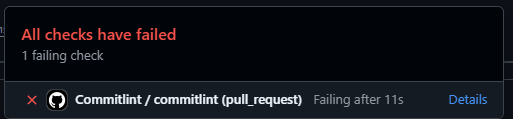
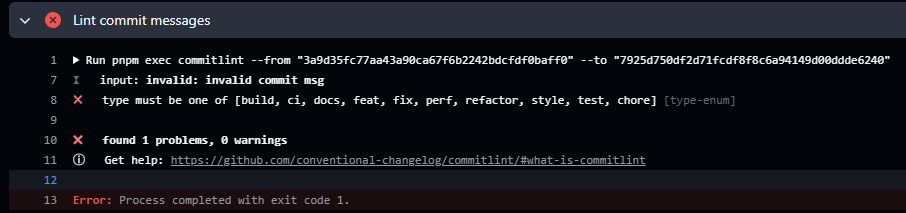
このリポジトリには Pre-Commit を設定していませんが、このように--no-verifyを指定すると突破できるので、Pre-Commit だけでは実はあまり効果がありません。
ただ、ブランチプロテクションを有効にしているとforce pushはできず、PR再作成の手間が発生するので、開発者体験向上のために Pre-Commit は設定しておくのが良いと思います。
また、省略しましたが、参照元リポジトリでも dependabot を設定しておくと共通ルール更新の適用が効率化できます。
以上です。